All-in-One CRMThat Grows Your Business
Bookings, the till, LINE and revenue on one record per customer.
- Light $29/mo
- No credit card required
- Add only the modules you need
No card details are asked for at sign-up. The form has five fields.
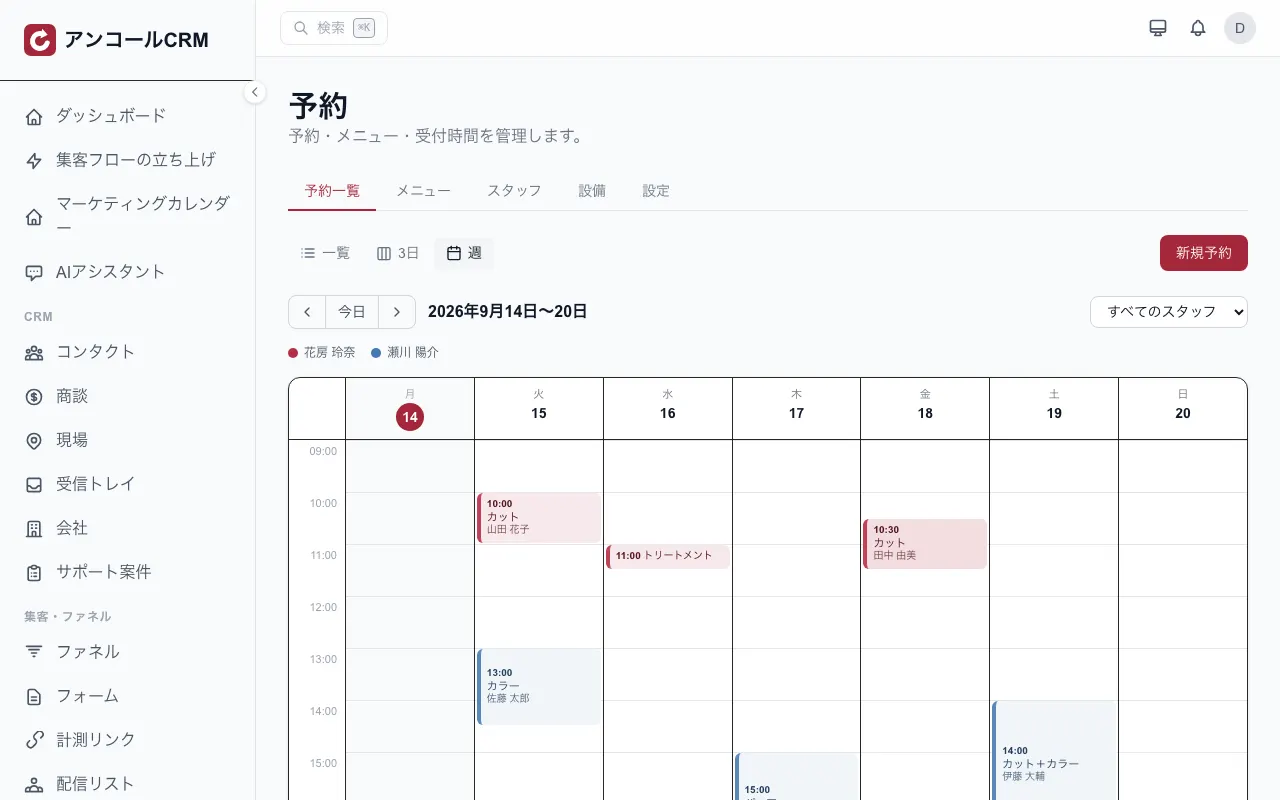
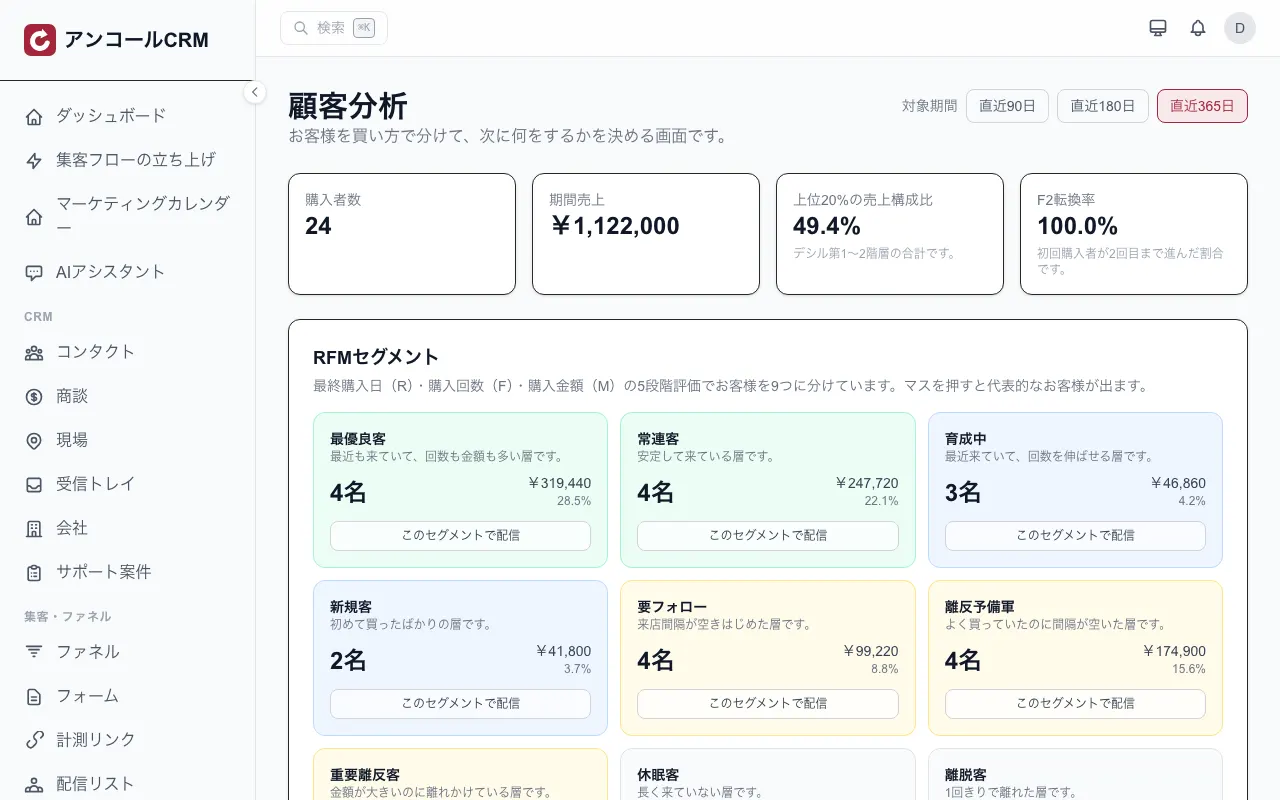
Group customers into nine segments and send to a segment as a mailing list
How it arrives on LINE (example)
- 24 hours before the visit (default, automatic)A reminder: your booking is tomorrow at 14:00.
- To clients who haven't visited for a while (filtered, then sent)It's been a while. Book your next visit here.
Which describes you?
Works with the tools you already run
Bookings, the POS till, calendars and payments all land on one record per customer.
- LINE account integrationBroadcasts and replies
- Smaregi (cloud POS)Sales and members
- Hot Pepper BeautyBooking emails (import only)
- Google Calendar™Staff schedules
- Stripe ConnectPaymentsComing soon
Show details
- LINE account integration
- Connect your LINE official account (Messaging API) and run broadcasts and replies from the admin screen.
- Smaregi (cloud POS)
- Sales, products, stock and members are synced, and points can be written back from Kashiwade CRM.
- Hot Pepper Beauty
- Booking notification emails from Salon Board are picked up automatically, and past records can be imported from CSV.
- Google Calendar™
- Each staff member connects their own Google account, and events sync both ways.
- Stripe Connect
- Connect your own Stripe account and take the money into it directly.
LINE and the LINE/LY Corporation logos are trademarks of LY Corporation. Google Calendar™ is a trademark of Google LLC. "Smaregi" is a registered trademark of Smaregi, Inc. "Hot Pepper Beauty" is a registered trademark of Recruit Co., Ltd.
When the tools are split, the customer is not one person
These are the problems we hear most from people looking to switch.
Bookings, till and messaging live apart
Nobody can see who is handling it
First-time customers do not come back
You cannot tell what worked
Kashiwade CRM brings all four onto a single record.
Show details
- Bookings, till and messaging live apart
- The same customer is recorded in three separate tools, so nobody knows which one to read before they arrive.
- Nobody can see who is handling it
- Enquiries land in a single person's mailbox, so the team cannot tell what has already been answered.
- First-time customers do not come back
- You notice that someone has stopped visiting too late to say anything to them.
- You cannot tell what worked
- Sends are not tied to revenue, so there is nothing solid to base the next decision on.
The three areas people check first are all shipped
These are the areas most often weighed against a single-purpose tool. The category list below spells out what each one contains.
Depth on LINE
Step delivery, rich menus that vary per friend, and LIFF mini-apps for booking, membership cards, points, prize draws and ticket books — all built from the screen.
See this feature →Shared inbox for enquiries
Mail arriving on a dedicated address is shared with the team, with assignment, status and a collision guard in one place.
See this feature →Customer analysis
RFM, decile and F2 repeat-rate analysis come as standard, and any segment turns straight into an audience.
See this feature →Everything You Need to Succeed
Pick the plan that fits your business, and add an option only when you need it.
See every feature we ship →CRM & Contact Management
Manage contacts, companies, and deals with a powerful pipeline view. Track every interaction and never miss a follow-up.
Marketing Automation
Create email and LINE campaigns, segment audiences, and run A/B tests to maximize engagement and conversions.
SNS Automation
Automate LINE with scenario flows. Broadcast to every friend at a time you schedule, respond to messages, and connect Instagram messaging.
Task Management
Kanban boards, project templates, and recurring tasks. Keep your team organized and productive.
Payment Management
Accept payments, send invoices, manage subscriptions, and create payment links. Powered by Stripe.
Analytics & Reports
Track sales, marketing, and customer metrics with custom dashboards and exportable reports.
Website chat
Drop a chat widget onto your site. The greeting appears automatically, your team replies from the admin screen, and the conversation history stays with the visitor.
Forms & Surveys
Build forms and NPS/CSAT surveys. Collect leads, gather feedback, and measure customer satisfaction.
Built for Every Industry
See how businesses in your industry use Kashiwade CRM to grow and streamline operations.
See all use cases by industry →- Beauty SalonBring the booking diary and the client record together, and let the follow-up to the next visit run on its own.
- RestaurantLink your LINE friends to real customer records, and let visit frequency and recency decide the next move.
- RetailBring in-store and online purchases into one customer ledger, then group customers by how they buy and decide the next move.
- School & EducationManage student inquiries, automate enrollment workflows, and communicate with parents.
- Fitness & GymsMembership billing and joins/cancellations in one place — and a signal when a member stops turning up, while there is still time to reach out.
- Clinic & HealthcareAutomate online booking, reminders and next-visit notices so reception spends less time on the phone — and gets intake forms before patients arrive.
- Hotels & LodgingTurn a one-off OTA guest into a direct-booking regular: move the post-stay relationship to LINE and win back the commission.
- E-CommerceAutomate post-purchase follow-up, win back lapsed customers, and keep each customer's purchase history in one place.
- Real EstateAnswer portal enquiries the moment they land, keep every follow-up on one timeline, and track viewings through to contract in a deal pipeline.
- Construction & RenovationSite survey, quote, order, build and invoice as one job. The quote becomes the invoice, so nothing gets retyped into a spreadsheet.
- Professional ServicesFrom the first consultation booking through to engagement and retainer — one line, with deadlines tracked and monthly retainer invoicing automated.
- ConsultingTrack deals, manage client relationships, and streamline project delivery.
- Estate Clearance & BuybackTrack every valuation request through visit to purchase. Take photo valuations over LINE and book the visit in the same flow.
- Clubs & AssociationsYour member roster, your announcements and your event sign-ups in one place — the same member records carry from the roster to the mailout to the attendance list.
Something They Can Try Today: A Quiz
From a skin-type quiz to a renovation cost estimate, 22 templates ship by trade. The verdict shows on the spot and becomes a tag that feeds the next message.
- Type match
- Score band
- Ballpark figure
How fast do you recoup the cost?
Enter your numbers — see how few sales cover the monthly cost.
You cover the monthly cost with just
2 sales / month
≈ $1.83 per day — anything above is profit.
Estimate only. Actual results vary by usage and conversion.
Pricing as simple as picking one plan
For salons, restaurants and communities: $55/month (tax excluded). Try every feature free for 30 days, and the price doesn't change as your team grows.
Start small with Light ($29/month), or choose Pro ($109/month) for everything and multiple locations. Pay yearly and get 2 months free.
Light
The smallest way to start connecting with members on LINE.
$29/mo
Or $290/yr billed yearly (2 months free)
- LINE membership card, points and stamps
- In-store QR and customer records
- Coupons and broadcasts
1 GB storage, Unlimited staff
Coming soonIndustry plan
Your industry's setup, built in. All three cost the same.
$55/mo
Or $550/yr billed yearly (2 months free)
Everything in Light, plus
Salon
- Booking, client records, stylist requests and commission
- Automated messages that bring clients back
- Shared inbox for LINE and email
Restaurant
- Taking and managing reservations
- Return-visit scenario templates
- Shared inbox for LINE and email
Community
- Member roster with group and role tags
- Event sign-ups and attendance
- Notice and handout pages
10 GB storage, Unlimited staff
Coming soonPro
Everything in an industry plan, plus Growth, Insights and Payments, and a head-office view across locations.
$109/mo
Or $1,090/yr billed yearly (2 months free)
- Includes the Growth, Insights and Payments add-ons
- Head-office dashboard and cross-location analytics
- $29/mo for each location after the first
50 GB storage, Unlimited staff
Payments are coming soon. Once released, you can use them on Pro as it is.
Coming soonLight is the entry point for reaching out (membership cards, broadcasts, coupons). The shared inbox, where your team receives and answers customer email, LINE and Instagram enquiries, starts with the industry plans.
Prices in USD exclude tax (JPY prices include tax).
30-day free trial
Every Pro feature is free for 30 days from signup. No card needed, and each organization gets one trial.
Unlimited users
The price stays the same however many people use it (no per-user fees). Give every member of staff an account.
Pay yearly, get 2 months free
Yearly costs 10 months of the monthly price. Monthly plans can be canceled any time (yearly plans are not refunded mid-term).
How getting started works
- 1
Sign up
Enter your email address, name and company name, then type the confirmation code we email you. Register a passkey on your device and you are done — there is no password to create. No card details are asked for.
5 fields
- 2
Set things up
You start with the screens this industry uses. Contacts can be imported in bulk from CSV.
Bulk CSV import
- 3
Go live
The LINE and POS integrations can be added from the settings when you need them.
One settings screen
Frequently asked questions
The answers we are asked for most often, before you have to ask.
How much does it cost?
For salons, restaurants and communities: $55/month (tax excluded). Try every feature free for 30 days, and the price doesn't change as your team grows. Start small with Light ($29/month), or choose Pro ($109/month) for everything and multiple locations. Pay yearly and get 2 months free.
Is there a free plan?
There is no free plan. Every Pro feature is free to try for 30 days after signing up, with no card required. Email and LINE sends are capped during the trial. After the trial a plan is required; the smallest, Light, is $29/mo. If you subscribe during the trial, billing starts when the trial ends. Each organization gets one trial, including when you start from Smaregi.
Do we need to bring our own LINE official account?
Yes. You provide your own LINE official account (a Messaging API channel) and a LINE Login channel. Everything is entered on a single settings screen: the channel access token, the channel secret, the login channel ID and secret, and the LIFF ID. One LIFF ID per organization covers every customer-facing screen, including membership cards, booking, points, lotteries and prepaid passes.
Can we bring the data we already have?
Contacts can be imported from CSV. You review the rows and any duplicate email addresses before confirming, companies are created automatically from the company-name column, and tags can be set in a column too. Reservations and customer records can be imported from salon booking-site CSV files; ask us which formats are supported. Products are synced through the POS integration.
What happens to our data if we cancel?
On monthly billing you can cancel any time from billing settings (yearly plans are not refunded mid-term). Canceling or reaching the end of your trial never deletes your data. Core data such as customers, bookings and sales stays viewable and exportable. Editing, sending, and bookings/forms are paused. Data created with plan features (broadcasts, automations, the shared inbox) becomes available again once you choose a plan. Shared inbox conversations can be exported as CSV even without a plan. To export or delete your organization's data, contact support.
About the Google Calendar integration
When a staff member connects Google Calendar with their own Google account, we read the time ranges in which their calendar has events (start and end times only) so that no booking is placed while they are busy. We do not read event titles or details. See our Privacy Policy for more.
Ready to Grow Your Business?
Customer management, marketing automation and revenue tracking in one place. See it on your own data.
Coming soonNo card details are asked for at sign-up. The form has five fields.