Store and online purchases, in one history per customer
Group customers by how they buy, then follow up with membership cards, points and LINE.
No credit card required to sign up.
How it arrives on LINE (example)
- When a customer scans the QR at the counterYour points have been added. Check the balance on your LINE membership card.
- To your top-spending tier (pick the tier, then send)Thank you for your support. A note for our best customers.
Import Smaregi transactions as they are
Transactions, products, members and stock come in, and each sale becomes the customer's purchase history. Duplicates are prevented by transaction number.
Works without a physical store
The customer ledger, member analytics, LINE messaging and membership cards do not need a register.
Membership cards on LINE
Hand over a card with rank and points on LINE. Points accrue from a QR at the counter or from register sales.
What you get
- ✓In-store and online customer data live in separate places
Only one shared ledger lets you group customers by how they actually buy.
- ✓You cannot say, in numbers, who your top customers are
Split customers into ten bands by spend and it is obvious which band carries the revenue.
- ✓The membership card is paper, so customers hunt for it at every visit
As a LINE membership card it is always in their pocket.
- ✓Till revenue and customer records are not connected
Import Smaregi transactions and each sale becomes that customer's purchase history.
- ✓You have no way to reach the people you want back
A segment defined by buying behaviour becomes a send list as it is.
- ✓The stock recount lands all at once at the end of the month
Keep a stock figure and a movement log per item, and low stock gets flagged.
Before and after
How it works today
- Paper membership cards in store, a separate system online
- Your top customers are 'probably that person'
- Till figures can only be read as a revenue total
- The membership card is paper, hunted for at every visit
How it works after
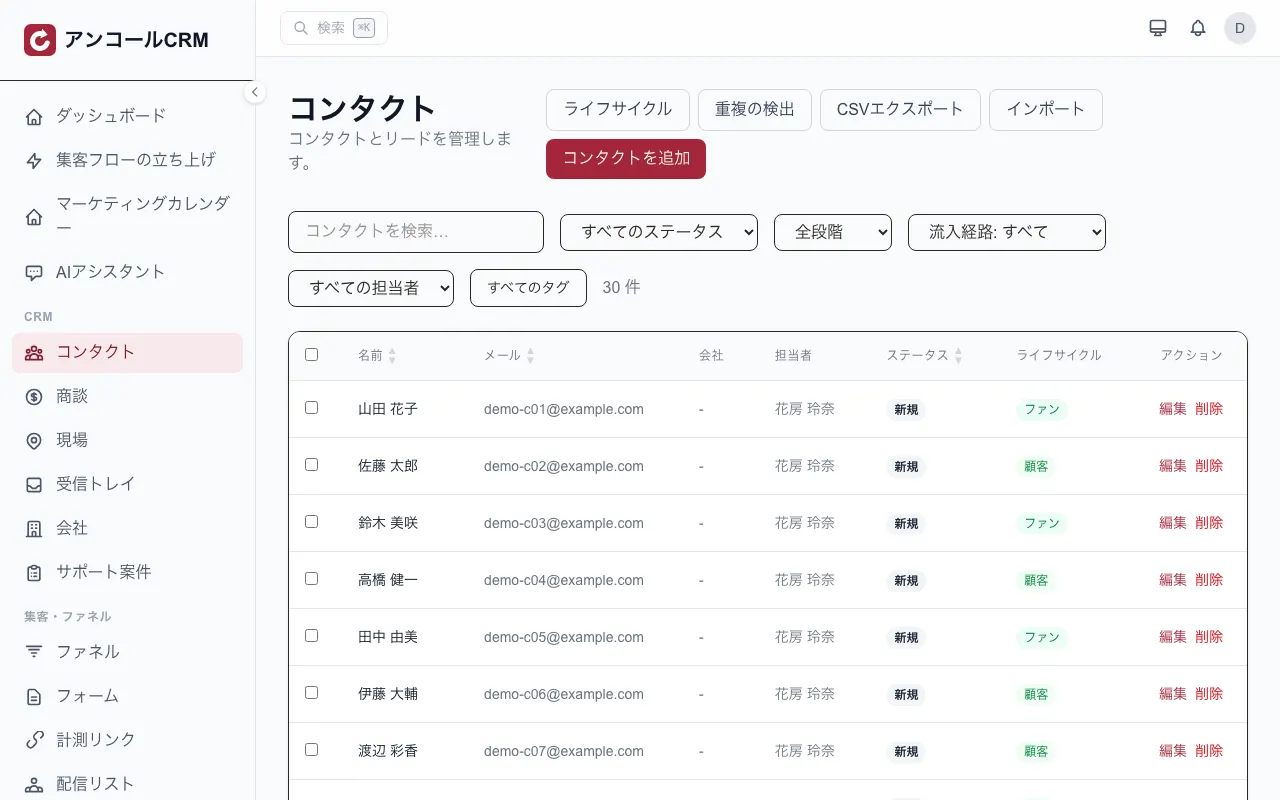
- In-store and online purchases stack up on the same customer record
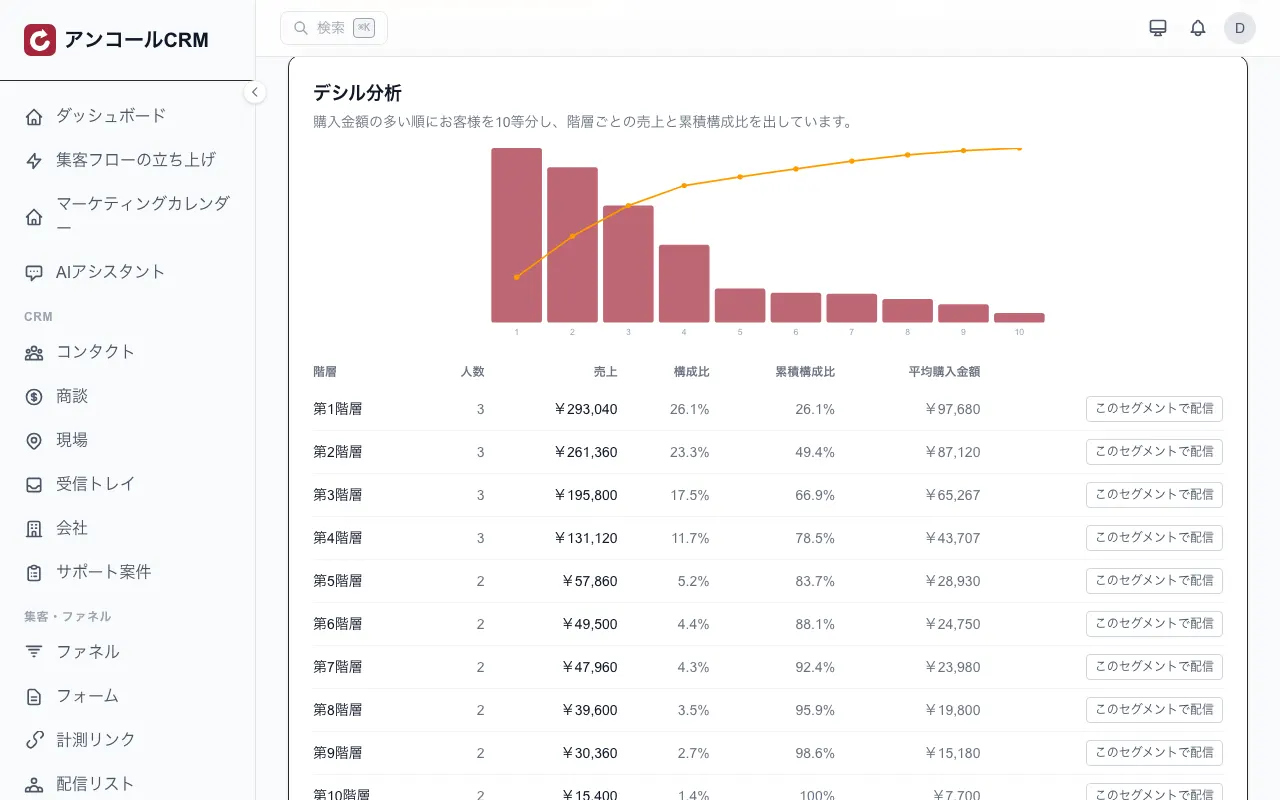
- Customers split into ten bands by spend, with revenue and cumulative share per band
- Smaregi transactions come in and each sale becomes that customer's purchase history
- A LINE membership card shows rank and points, and the counter QR code tops them up
How this industry uses it
Customer analysis (deciles and RFM)
Decile analysis, which splits customers into ten bands by spend, and RFM, which splits them into nine segments by recency, frequency and spend, sit on the same screen. Pick a segment and it becomes a send list.
See this feature →One customer ledger
In-store and online purchases stack up on the same customer. Filter by lifecycle stage, acquisition source and tags, and send to whatever the filter leaves you with.
 See this feature →
Smaregi integration
Transactions, products, members, stock and timecards are imported from Smaregi, with the transaction number preventing duplicates. The only thing sent back to Smaregi is loyalty points, and only if you turn that on.
See this feature →Membership cards and points
Hand out a membership card carrying rank and points through LINE. Points are earned by scanning the counter QR code, or automatically from a till or Smaregi sale. Expiry can be set.
See this feature →Segmented LINE delivery
Turn a behaviour-based segment into a send list and message it on LINE. It reaches the friends of your LINE Official Account that are linked to a customer record.
See this feature →The cost pays for itself — fast
How fast do you recoup the cost?
Enter your numbers — see how few sales cover the monthly cost.
You cover the monthly cost with just
2 sales / month
≈ $1.83 per day — anything above is profit.
Estimate only. Actual results vary by usage and conversion.
Quizzes for this trade
The verdict shows on the spot and becomes a tag that feeds the next message.
Use case
How getting started works
- 1
Sign up
Coming from this page opens the sign-up form with your industry already selected.
5 fields
- 2
Set things up
You start with the screens this industry uses. Contacts can be imported in bulk from CSV.
Bulk CSV import
- 3
Go live
The LINE and POS integrations can be added from the settings when you need them.
One settings screen
FAQ
- What exactly syncs with Smaregi?
- Transactions, products, members, stock, timecards and bookings are imported from Smaregi into Kashiwade CRM, with the transaction number preventing duplicates. The only thing sent back to Smaregi is loyalty points, and only if you turn that on. Products, stock and customer records are never written back.
- Can we use it online only, without a physical shop?
- Yes. The customer ledger, customer analysis, LINE delivery and membership cards all work without a till. Purchase records build up either from the browser-based till screen or from the Smaregi import.
- Can stock be managed separately per shop?
- No. Stock is a single figure per item, with a movement log and stocktakes. Purchase orders, supplier management and lot or best-before tracking are not supported. Viewing revenue per shop from head office is a separate feature.
- What counts as a 'purchase' in the customer analysis?
- Purchase records with an amount greater than zero. Till and Smaregi sales and payment records are included. Visit-only records with no amount are counted in neither frequency nor spend.
What to do next
Check the price, then go straight to sign-up.
Pricing
Pick one plan, then add options when you need them.
- ✓Salons, restaurants and communities: $55/mo (tax excluded)
- ✓Same price however many people use it (no per-user fees)
- ✓Add or stop add-ons at any time
You go to sign-up with the industry already selected. You can change it during setup.