Booking, LINE and client records for your salon, in one place
From logging a booking to the day-before reminder and LINE messages to clients drifting away, keep every client connected to their next visit.
No credit card required to sign up.
How it arrives on LINE (example)
- 24 hours before the visit (default, automatic)A reminder: your booking is tomorrow at 14:00.
- To clients who haven't visited for a while (filtered, then sent)It's been a while. Book your next visit here.
Keep your current booking site
Keep your listing as it is. Bookings come in from notification emails and CSV.
Start from a salon template
Pick a template such as the next-visit reminder, fill in the blanks, and it starts running.
Day-before reminders are automatic
Sending is scheduled the moment a booking is saved, which helps cut no-shows caused by forgotten reminders.
What you get
- ✓Bookings arrive by phone, LINE and booking sites, so no single diary is ever complete
Every extra channel means more re-typing, which is where double bookings come from.
- ✓A client's preferences and treatment history live in paper cards and one stylist's memory
The day the stylist changes, nobody can look up what was done last time.
- ✓Reminders are sent by hand, and the ones that get forgotten turn into no-shows
Scheduling the reminder when the booking is taken removes the manual step.
- ✓Clients who have stopped coming are noticed far too late
Grouping clients by days since their last visit means you can reach out while it still matters.
- ✓The LINE friend count grows, but the friends are not matched to clients
Only once a friend is linked to a client record can you send based on visit history.
- ✓You want more referrals, but there is nothing behind the ask
Referral codes and recorded conversions let you count who actually referred whom.
Before and after
How it works today
- Compare the phone, LINE and the booking site, then copy it all into a paper diary
- A staff member picks the recipients and sends each reminder by hand
- Treatment history and preferences sit in paper cards and in one stylist's head
- A client who has drifted away is noticed long after they stopped coming
How it works after
- One calendar holds every booking, and new bookings and cancellations are pulled in automatically from Salon Board notification emails
- The reminder is scheduled the moment the booking is saved and goes out the day before
- Visit count, lifetime spend, next booking and tags all sit on one client page
- Clients fall into segments by last visit and visit count, and a segment becomes a send list as it is
How this industry uses it
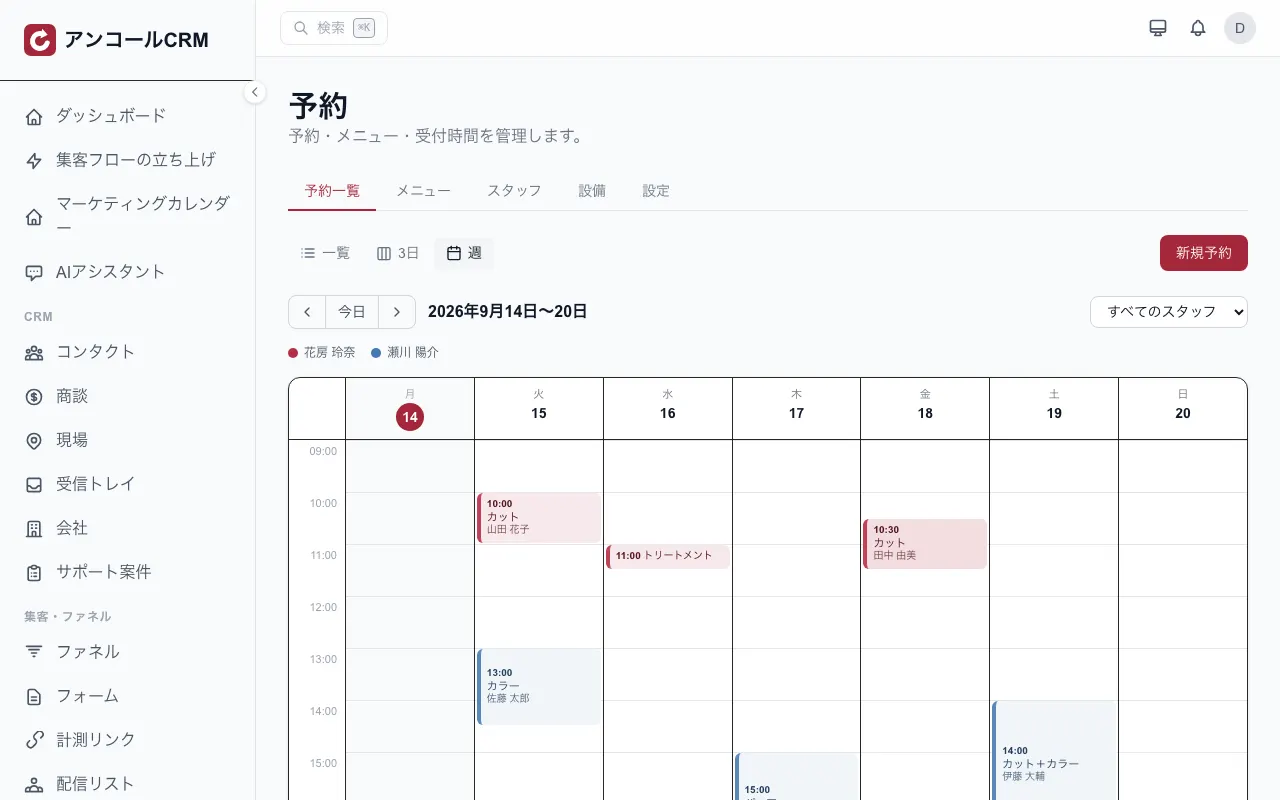
Booking diary and calendar
See bookings in a week, 3-day or list view. Click an open slot to book straight into it, and colour coding by staff member shows how full each person is. Shifts and time off can be entered too.
See this feature →Automatic booking reminders
The reminder is scheduled as soon as the booking is saved. The default is 24 hours before the visit and can be changed in settings. It goes to whichever of email and LINE the booking has on file.
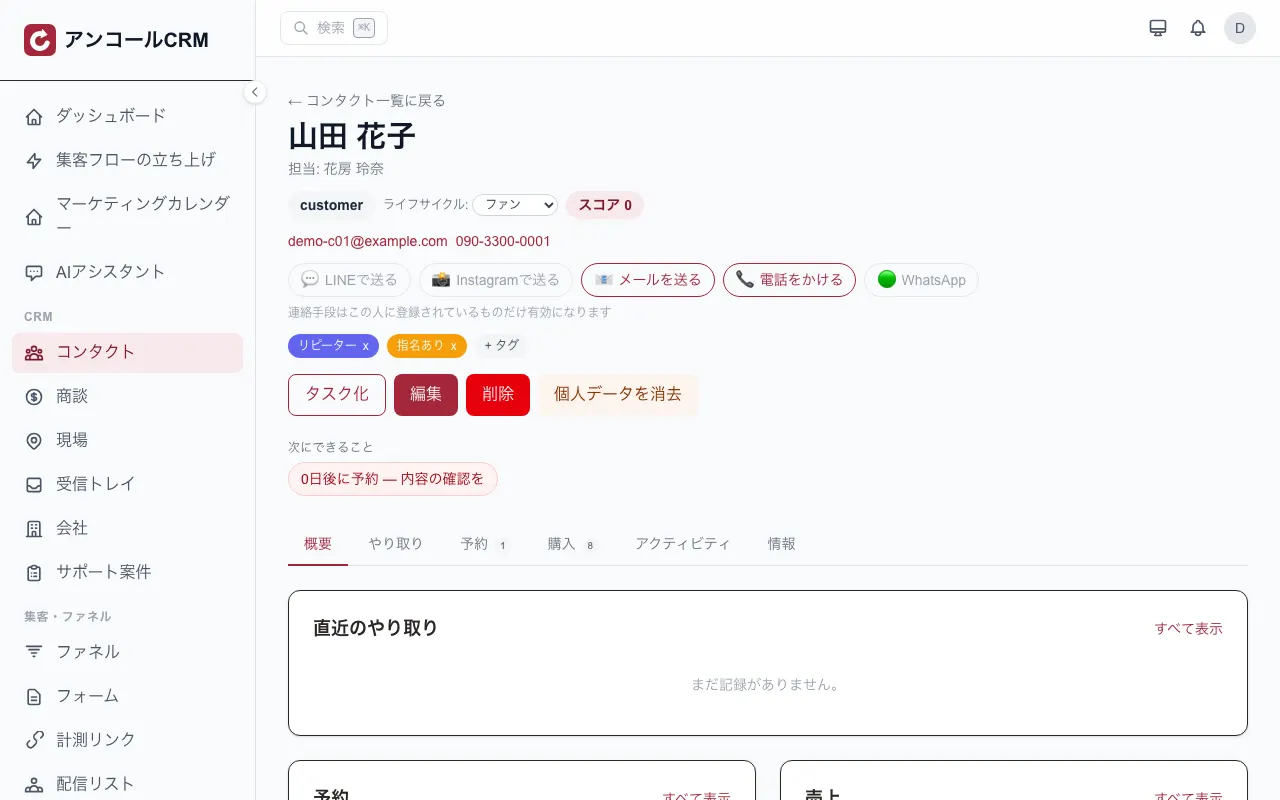
See this feature →The client record
Visit count, lifetime spend, next booking, tags and the full message history sit on a single client page. LINE, Instagram, email and phone can all be started from the top of that page.
 See this feature →
Segmented LINE delivery
Pick a send list and message those people on LINE. It reaches the friends of your LINE Official Account that are linked to a client record. You can mix and match with email.
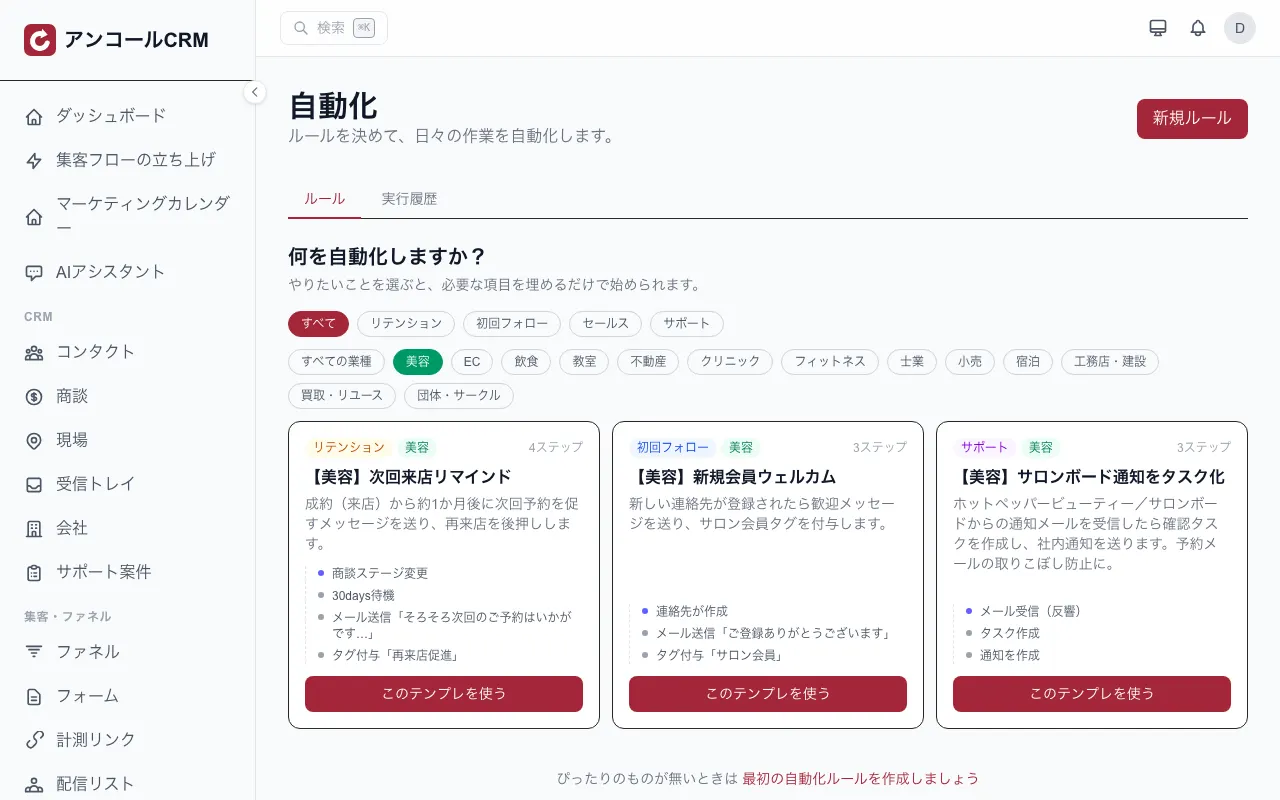
See this feature →Automated win-back follow-up
Start from a salon template such as 'next-visit reminder' or 'new client welcome'. Pick what you want to happen and you only have to fill in the blanks.
 See this feature →
Works with the tools you already use
Works with Hot Pepper Beauty — booking notification emails from Salon Board are imported automatically, so new bookings, same-day bookings and cancellations land in your reservations and customer records (CSV import for existing history).
The cost pays for itself — fast
How fast do you recoup the cost?
Enter your numbers — see how few sales cover the monthly cost.
You cover the monthly cost with just
1 sales / month
≈ $1.83 per day — anything above is profit.
Estimate only. Actual results vary by usage and conversion.
Quizzes for this trade
The verdict shows on the spot and becomes a tag that feeds the next message.
Use case
How getting started works
- 1
Sign up
Coming from this page opens the sign-up form with your industry already selected.
5 fields
- 2
Set things up
You start with the screens this industry uses. Contacts can be imported in bulk from CSV.
Bulk CSV import
- 3
Go live
The LINE and POS integrations can be added from the settings when you need them.
One settings screen
FAQ
- Can bookings from Hot Pepper Beauty (Salon Board) be imported?
- Booking CSV and customer CSV imports are supported. In addition, if you forward the booking notification emails from Salon Board to a dedicated address, new bookings and cancellations are imported automatically. Change notifications, availability sync and writing back to Salon Board are not supported.
- When and where are booking reminders sent?
- The reminder is scheduled when the booking is saved and, by default, sent 24 hours before the visit. The timing is configurable, and setting it to 0 turns it off. It goes by email and LINE, only to the contact details held on that booking, and only once per booking.
- Do we have to stop using our current booking site?
- No. You can keep your listing exactly as it is. Bookings can be imported from notification emails and CSV files, and you can also run your own booking page alongside it.
- Can we view each staff member's bookings separately?
- You can filter by staff member, and the calendar colour-codes each person. A grid with one column per staff member is not supported.
What to do next
Check the price, then go straight to sign-up.
Pricing
Pick one plan, then add options when you need them.
- ✓Salons, restaurants and communities: $55/mo (tax excluded)
- ✓Same price however many people use it (no per-user fees)
- ✓Add or stop add-ons at any time
You go to sign-up with the industry already selected. You can change it during setup.